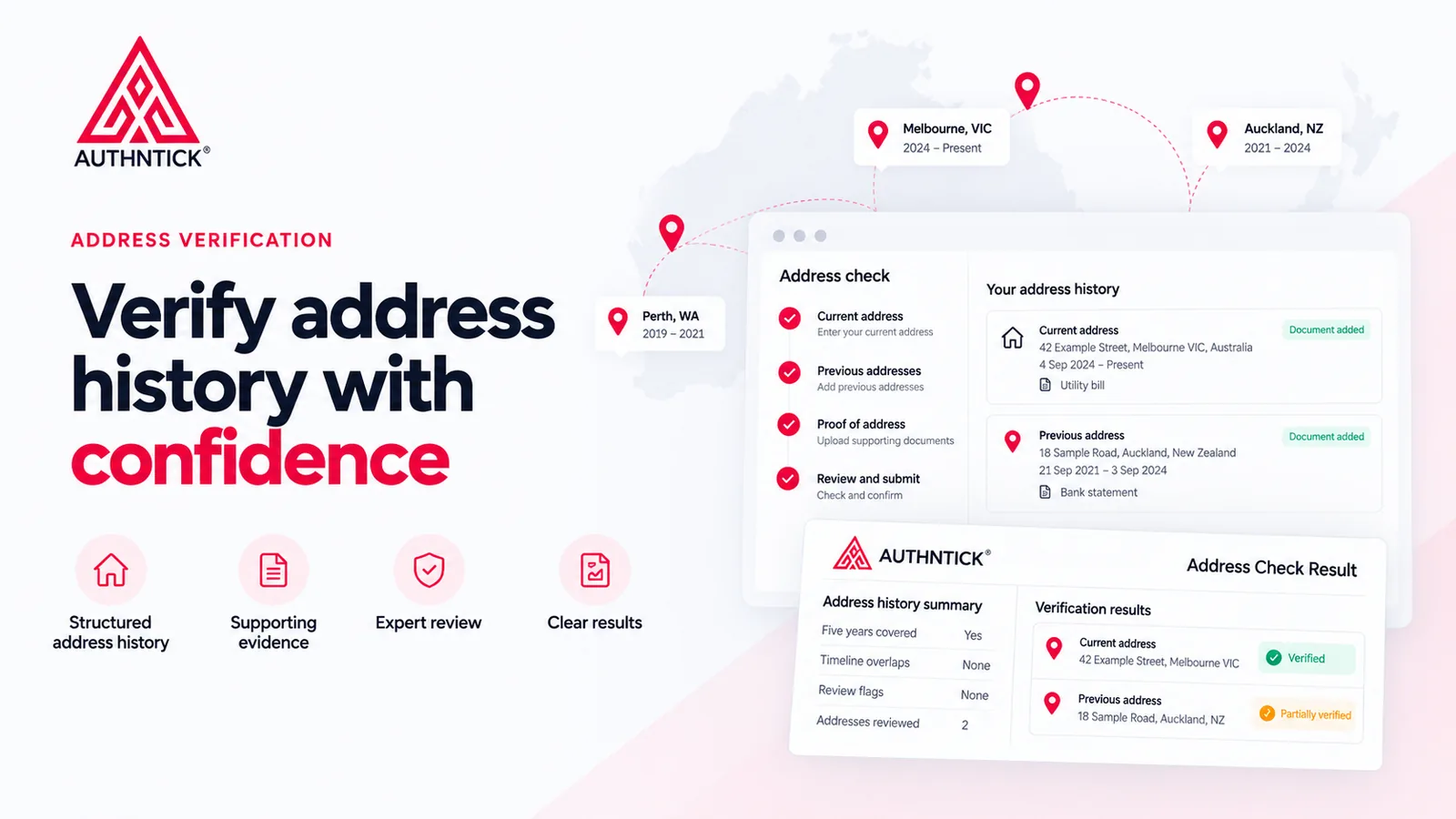
An address verification check brings together a candidate’s residential history, proof-of-address documents and a review of what that evidence supports. The useful result is a documented assessment for each address, with enough context to understand limitations and differences.
This guide explains the candidate’s role, what happens after submission and how employers can read an Address Check Result without treating an address lookup as proof of residence.
Explore address verification with AuthNTick
See the candidate workflow, reviewer assessment and sample result.
Start an address checkWhat is an address verification check?
Residential address verification reviews where a candidate says they currently live or previously lived, the residence dates they supply and the available evidence. It can identify missing periods, differences between documents and entered details, and information that cannot be fully supported.
An address history check does not establish property ownership, prove identity by itself or guarantee that every address associated with an individual has been identified. The scope is the information supplied and evidence available at the time of review.
Why employers verify candidate address history
Employers may include residential history in pre-employment screening to create a consistent record, compare evidence with candidate-provided information and identify discrepancies requiring further review. The choice of checks should reflect the role, organisation and screening purpose.
A difference is a reason to understand the context, not automatically an adverse finding. A name variation, recent move, shared accommodation or overseas document can affect what the available evidence shows. Reviewer notes help explain these circumstances.
Address history, address validation and verification
Address history is the candidate’s timeline of current and previous residences. Address validation checks whether an address can be recognised or resolved by an address data service. Address verification considers supporting evidence for the candidate’s claimed residence.
A location can be found through an Address API without any evidence that the candidate lived there. Likewise, a manually entered address can have useful supporting documents even when automatic address validation is unavailable.
How the AuthNTick process works
The candidate builds their residential timeline, supplies a document for each address, reviews their information and gives declaration and consent. AuthNTick then reviews the evidence and records a separate outcome for each address before generating the result.
- 01Current address
Enter country, residential address and move-in date.
- 02Build address history
Add previous addresses and account for missing periods.
- 03Upload proof of address
Add evidence for each address, then review and consent to submission.
- 04AuthNTick review
Compare candidate information with supporting evidence.
- 05Address Check Result
Receive a documented outcome for each address reviewed.
Step 1: Current residential address
The candidate enters their country, residential address and move-in date. Australian addresses can use the supported lookup workflow. Where an address is matched, its formatted version and validation status can be recorded.
If the candidate cannot find their address, manual entry is available. International histories can include country, address lines, city or suburb, state or province, postcode or ZIP and residence dates. A candidate should enter the actual residential details rather than select a nearby address just to obtain a match.
Step 2: Building the address history
Previous addresses and residence periods are added until the required screening period is accounted for. AuthNTick makes missing dates visible and asks the candidate to supply the address for that period or correct an inaccurate date.
For example, a current residence beginning on 4 September 2024 would leave an earlier period to account for in a five-year window beginning on 22 September 2021. Adding the relevant previous residence can complete that timeline.
The current AuthNTick candidate workflow collects five years of residential history. This is product behaviour, not a universal legal requirement or a period prescribed by AS 4811:2022 for every candidate. Organisations should determine the appropriate screening scope and discuss different requirements with our team.
“Address history complete” means the entered dates cover the required period. It does not mean every address has been verified.
Step 3: Providing proof of address
The candidate associates a supporting document with each residential address and records its type and issue date. Keeping evidence with the relevant address helps the reviewer compare the candidate’s name, the residential details and the period claimed.
Examples of evidence types offered in the workflow include:
- Utility bill or bank statement
- Lease or tenancy agreement
- Council rates notice or government correspondence
- Insurance document
- Driver licence showing address
- Other document showing name and address
These are options for submission, not a guarantee that every document will be accepted. Suitability depends on the screening requirements and circumstances. A recent bill may support a current residence without establishing every year of occupancy.
Check that relevant details are readable. The current workflow accepts PDF, PNG and JPEG files up to 3 MB. If appropriate evidence is unavailable or the form does not fit your circumstances, contact support.
Step 4: Candidate review and consent
Before submitting, the candidate reviews the current and previous addresses, residence dates, document types and uploaded evidence in their timeline. “Document added” records an upload; it is not an evidence-verification outcome.
The candidate confirms that the history is complete and accurate and consents to AuthNTick verifying the information and supporting documents supplied. Corrections should be made before submission when a name, address, date or document is wrong.
What happens after submission?
Submission sends the supplied history and evidence for review. It does not automatically establish proof of residence or mark all addresses as verified.
Where more detail, a correction or another document is needed, the check can be returned through the Correction Required workflow. Once the review is finalised, AuthNTick generates the Address Check Result.
How AuthNTick reviews an address
The review brings together candidate information, supporting documents and address validation where available. For each address, the record can include the entered and formatted address, validation status, residence period, document type, matching assessments, verification method, outcome, timestamp and reviewer notes.
Name and address matching can be recorded as Yes, Partial or No. Methods can include Address API and Document review, depending on the information available. An API method label must be read with the evidence and notes; it is not itself proof of residence.
The example below is wholly fictional. Its current-address outcome includes a utility bill review. The previous address has a name variation recorded in the notes.
Current address
42 Example Street, Melbourne VIC, Australia4 Sep 2024 — Present
- Name on evidence matches candidate
- Yes
- Address on evidence matches entry
- Yes
- Verification method
- Address API
- Result
- Verified
Address resolved and supporting utility bill reviewed.
Previous address
18 Example Road, Auckland, New Zealand21 Sep 2021 — 3 Sep 2024
- Name on evidence matches candidate
- Partial
- Address on evidence matches entry
- Yes
- Verification method
- Document review
- Result
- Partially verified
Supporting document reviewed; name variation identified.
Understanding Address Check results
The report separates an Address History Summary from the Verification Results. Start with the summary: five-year coverage, timeline overlaps, review flags and number of addresses reviewed. Then read each address assessment.
Each address can show its residence period, result, evidence type and filename, name and address matching, verification method, Address API status and formatted address where available. The review timestamp and notes explain when the assessment was recorded and any relevant limitations.
Summary fields do not replace per-address findings. For example, a report may show no review flags while an individual address is partially verified and a limitation is explained in its reviewer notes.
ADDRESS HISTORY SUMMARY
- Five years covered
- Yes
- Timeline overlaps
- None
- Review flags
- None
- Addresses reviewed
- 2
VERIFICATION RESULTS
4 Sep 2024 — Present
- Evidence type
- Utility bill
- Name matches
- Yes
- Address matches
- Yes
- Verification method
- Address API
- Address API status
- Resolved
- Evidence file
- example-utility-bill.pdf
- Formatted address
- 42 Example Street, Melbourne VIC, Australia
- Reviewed at
- 22 Sep 2026, 10:00 am AEST
Address resolved and supporting utility bill reviewed.
21 Sep 2021 — 3 Sep 2024
- Evidence type
- Bank statement
- Name matches
- Partial
- Address matches
- Yes
- Verification method
- Document review
- Address API status
- Manual
- Evidence file
- example-bank-statement.pdf
- Formatted address
- Manual entry
- Reviewed at
- 22 Sep 2026, 10:00 am AEST
Supporting document reviewed; name variation identified.
Verified vs partially verified addresses
One report can contain different outcomes for different addresses. Read the result alongside matching fields, method and notes:
- Verified: the address is supported by the evidence reviewed.
- Partially verified: some information is supported, with limitations.
- Unable to verify: available information or evidence is insufficient.
- Discrepancy identified: a difference requires attention.
A partial name match is not an automatic hiring decision. Consider the recorded explanation and any further information needed. Equally, a verified address does not establish every other claim made by the candidate.
Address API validation vs evidence-based verification
For an overseas or manually entered address, automatic validation may be unavailable. That limitation should be understood alongside the supporting evidence and recorded assessment; there is no claim that every overseas address has been matched against an authoritative international database.
Address verification and AS 4811:2022
AS 4811:2022 — Workforce screening provides a framework for organisation-specific screening policies and processes. Address verification can form part of a broader risk-based employment screening program aligned with its principles.
Structured collection, candidate consent, evidence review and documented results support that process. Appropriate screening still depends on the role, organisation, policies and review decisions. Five years is not a universal requirement for every candidate, and alignment does not mean certification of the individual check.
How address verification fits with other background checks
Address verification is one input into a broader screening process. It does not replace identity verification, criminal history screening, work history, reference checks or other checks appropriate to the role.
The report should not be the sole basis for an employment, engagement, licensing, regulatory or suitability decision. The customer remains responsible for its final decision in accordance with applicable laws, internal policies and the screening purpose.
Address verification is a point-in-time review. It does not establish property ownership or guarantee that every address associated with an individual has been identified. See the Address History Check screening terms for scope and limitations.
Frequently asked questions
What is an address verification check?
An address verification check reviews a candidate’s residential history, residence dates and supporting proof-of-address evidence. AuthNTick records review information and an outcome for each address in a structured Address Check Result.
How many years of address history are required?
AuthNTick’s current candidate workflow collects five years of residential history. This is not a universal legal requirement or a period required by AS 4811:2022 for every candidate. Organisations should determine their screening scope based on role risk and policy and discuss different requirements with our team.
What documents can be used as proof of address?
Examples include utility bills, bank statements, lease or tenancy agreements, government correspondence, council rates notices, insurance documents and a driver licence showing an address. Accepted evidence depends on the screening requirements and circumstances. Selecting a document type or uploading a file does not mean it has been accepted as proof.
Does an Address API match prove someone lives at an address?
No. An Address API can help determine whether an address exists or is recognisable. It does not establish that the candidate currently lives, or previously lived, there. The address verification outcome is based on supporting evidence reviewed by AuthNTick.
What happens if an address cannot be automatically validated?
The candidate can enter the address manually and provide supporting evidence. The review records the available validation information and the method used. A manual or unresolved address is not automatically a failed residence verification.
What does “Partially verified” mean?
Some information is supported, but the evidence does not fully support all details reviewed. Read the name and address matching fields, verification method and reviewer notes to understand the limitation. Different addresses in one report can receive different outcomes.
Can overseas addresses be included?
Yes. Manual entry supports international addresses, including country, address lines, city or suburb, state or province, postcode or ZIP and residence dates. Evidence is reviewed within available source limitations; AuthNTick does not independently verify every overseas address against an authoritative international database.
What happens if the supporting document does not fully match the candidate’s information?
The reviewer can record Yes, Partial or No for name and address matching, add notes and assign an appropriate address outcome. Further details or documents may be requested through the Correction Required check workflow. A mismatch needs context and is not automatically evidence of dishonesty.
Does an address check replace other background checks?
No. Address verification is one input into broader screening. It does not establish identity, property ownership, criminal history, employment history or suitability on its own, and the report should not be the sole basis for a customer’s decision.
How does address verification support AS 4811:2022 screening?
Address verification can form part of a broader risk-based employment screening program aligned with the principles of AS 4811:2022. Structured history, evidence, consent and review records support this process. Appropriate scope and decisions depend on the organisation’s policies and screening purpose; alignment is not certification of this individual check.
Start an address check
Explore AuthNTick’s collection, review and result workflow for your organisation.
Explore Address Verification
About the author
Rahul Tripathi
Engineering and technology contributor
Rahul Tripathi is an engineer with interests in computer networks, digital systems and applied technology. At AuthNTick, he contributes to guides about digital identity, verification technology and practical screening workflows.
Editorial references
Official and authoritative sources
Use these primary and authoritative references to confirm current requirements for the topic covered in this guide.
- Identity verification services IDMatch, Australian Government
- What is personal information? Office of the Australian Information Commissioner
- AS 4811:2022 Workforce screening Standards Australia
- Employment and privacy rights Office of the Australian Information Commissioner
This guide is general information, not legal advice. Government processes and employer requirements can change, so check the linked source and the requesting organisation’s instructions before acting. Read our editorial and corrections policy.
Next step
Ready to move from research to action?
Use AuthNTick to complete secure Australian background checks, or speak with our team if you need the right workflow for your organisation.